LangSmith 推出面向编码智能体的追踪功能,按成果归因成本
LangSmith for Coding Agents: Now track spend by outcome
LangSmith 现在提供专为编码智能体设计的报告功能,将智能体支出与生成的拉取请求关联,帮助计算预算 ROI 并了解模型和政策变更的影响。
Coding is the largest category of enterprise AI application spend, reaching $34B in 2026. Every company now wants to know what all that spend returns, but most engineering leaders still can’t give an exact answer to what it's buying.
To try to understand coding agent ROI, teams used to look at high-level data like usage analytics and AI consumption, but these don’t provide insight into what tokens actually produce. Answering the ROI question is hard and requires visibility into spend across users and teams, along with a way to connect it to outcomes. We felt this friction firsthand when spend with our own coding agent, Robin, started climbing, and is one of the reasons we built a model router.
Now we're excited to offer a practical solution for our customers too. LangSmith now offers reporting built for coding agents, along with new capabilities that tie their spend to the pull requests they produce. This provides a clearer way to calculate the ROI behind coding agent budgets and understand how changes to models and policies impact it.
Pull requests as the outcome of a session
The new LangSmith Agent Platform operates around the agent. Each agent has its own record and belongs to an "agent type" that determines what its dashboard shows, which data it connects to, and how it's evaluated. Coding agents are the first specialized agent type, and present data on pull requests, one of the signs that the agent's work is useful.
LangSmith already traces coding agents across model providers, including Claude Code and Codex. With coding agents in LangSmith, the spend in each trace is automatically attributed to pull requests each agent contributed to. The attribution reflects the tasks a coding agent is used for. It covers both cases where a single thread can open several PRs, and where a PR can take several threads to finish, so data in LangSmith reflects what your agents actually accomplished and what it cost.
One dashboard for every coding agent you trace
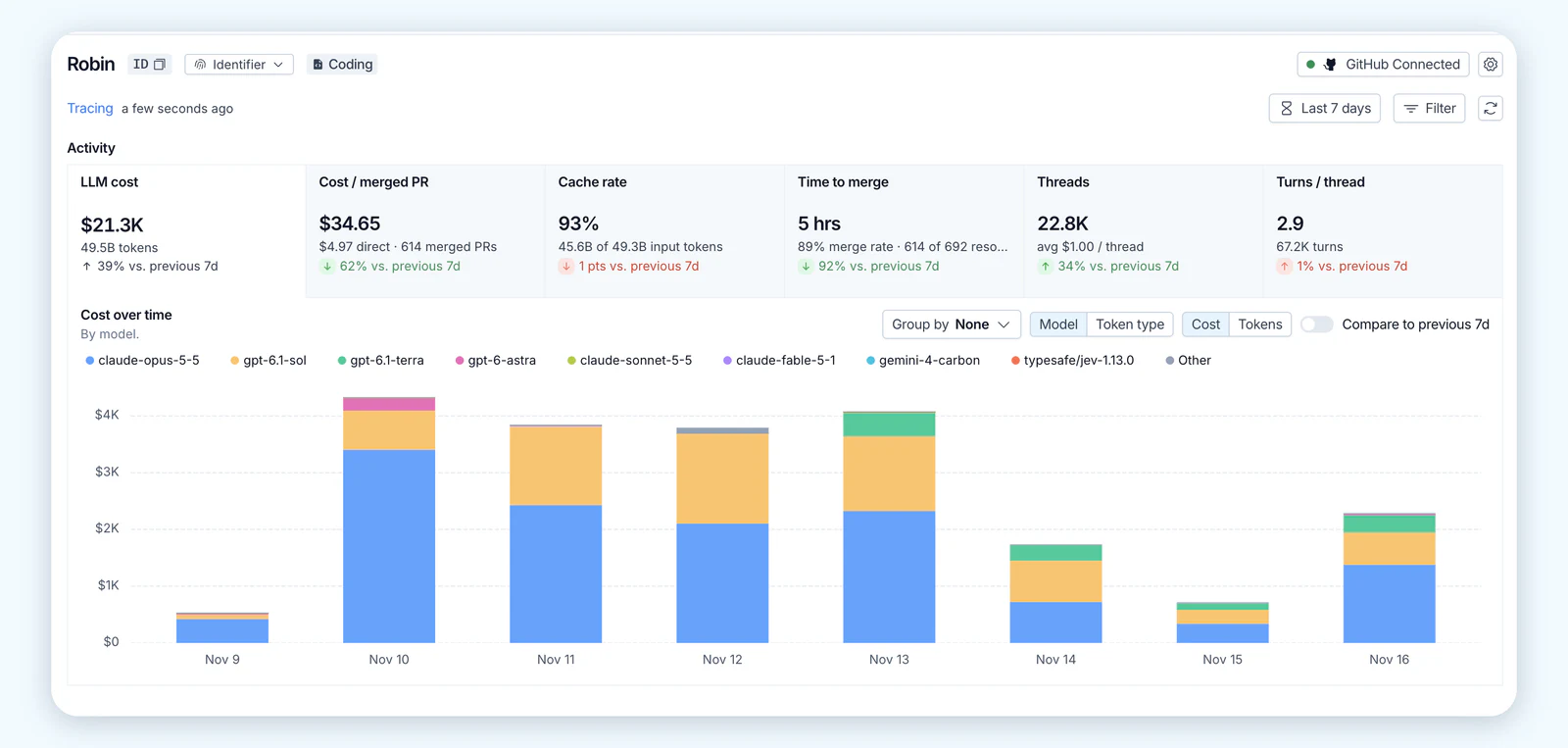
Up until today, LangSmith enabled you to see the cost per trace for any of your coding agents, one trace at a time. This is useful for manual debugging, but doesn't provide visibility into trends across the entire team. The new coding agent overview page aggregates those costs and ties them to the pull requests your agents worked on.
The dashboard shows KPIs at a glance, and clicking any metric opens its trend over time. For example, if your team switched models, you can compare before and after to see the impact of the change.
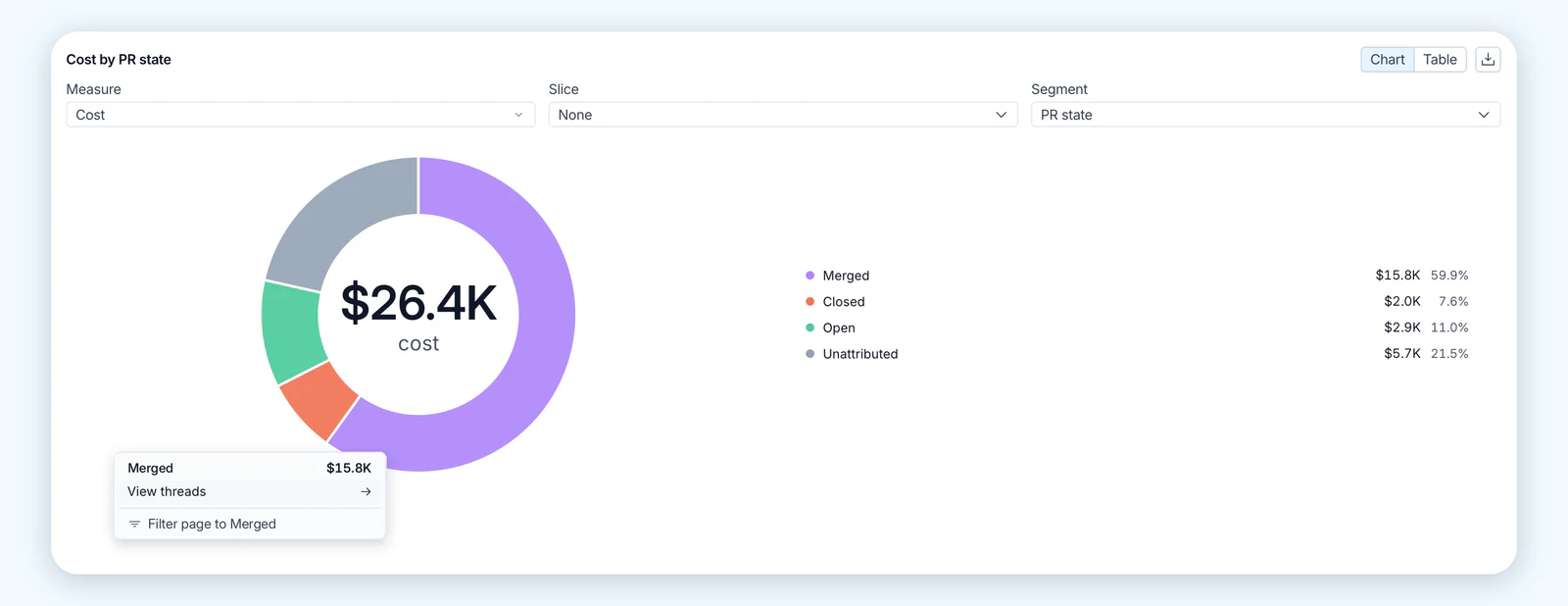
LangSmith also breaks spend down by the state of each PR (open, closed, or merged). This gives perspective to how many pull requests are merged as successful code but also how many are unresolved and closed. Merged pull requests are a useful signal, but they’re not the only sign of productive work. Coding agents are also used to review code and investigate problems, work that doesn’t always end in a PR. LangSmith tracks this spend separately as unattributed. You can click into it to open the threads behind it and see what that work actually was, and whether it was valuable.
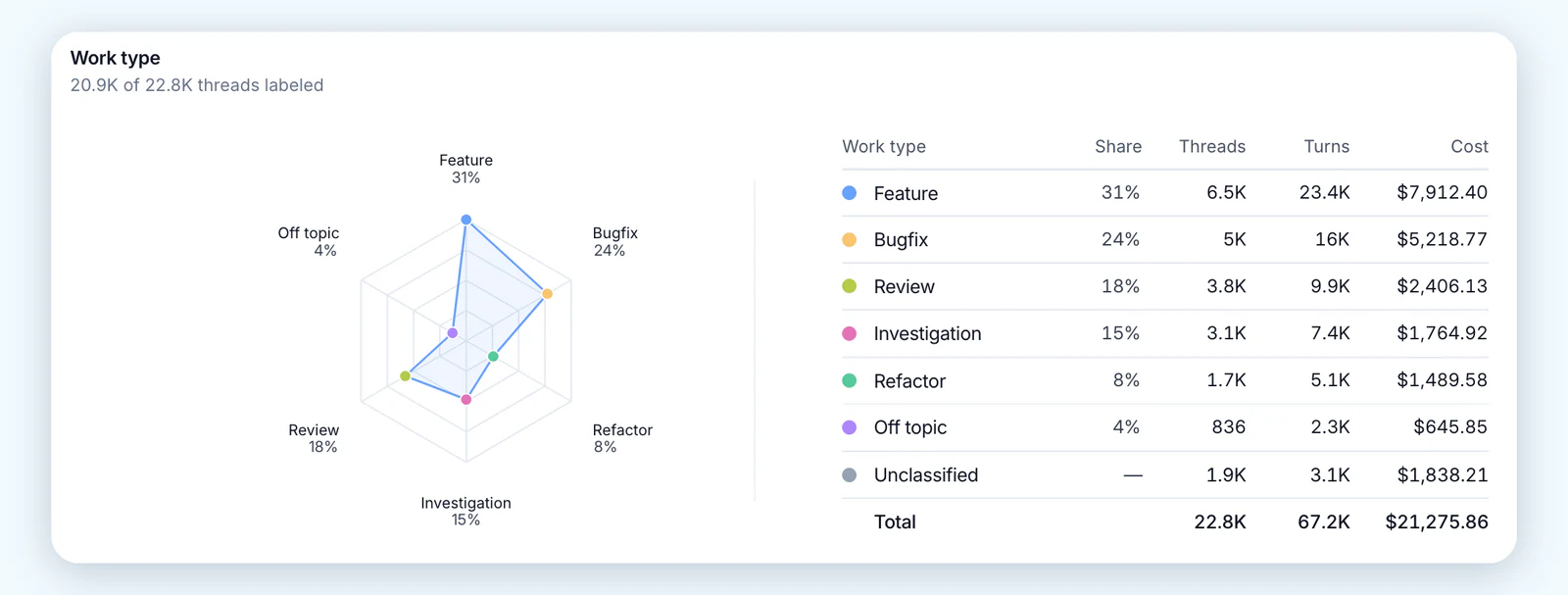
The work type view shows what your agents were asked to do. LangSmith labels each thread by the kind of work it asks for (e.g. features, bug fixes, investigation and code review), and shows the share of threads and cost for each type. Each organization decides what counts as off topic based on its own use cases, so a team that uses its coding agent only for backend services could flag threads where the user asks the agent to draft marketing copy. This view also helps explain unattributed spend, since reviewing and investigating threads often don't end in a PR of their own.
The dashboard also shows which skills your agents call, your most expensive PRs, and how cost scales with conversation length. Every metric links back to the threads and sessions behind it, so you can open the exact conversation and see what the agent did in that session.
Works with every major coding agent
Many engineering teams don’t run a single coding agent. Some engineers work in Claude Code, others in Cursor or Copilot, and platform teams often build their own with an open source harness like Deep Agents. LangSmith traces all of them into the same place, so spend and pull request outcomes roll up into one dashboard instead of being scattered across separate vendor consoles.
LangSmith for Coding Agents supports: Claude Code, OpenAI Codex, Cursor, GitHub Copilot in VS Code, and Deep Agents, for teams building a custom coding agent.
How teams can use these metrics
Create opportunities for coaching
Sorting by attributed cost shows which pull requests were the most expensive to produce, and each one traces back to its threads, the models involved, and the GitHub user behind it. Opening those threads shows why a PR cost what it did, such as a thread that kept growing or a frontier model used on a small fix. When one engineer gets the same kind of work merged for much less, you can find out what they do differently and share it with the team.
Long threads are another place where coaching can have a positive impact. Spend concentrates in very long threads, since every new turn carries the entire context of the conversation. Keeping one thread open across several tasks is an easy habit to fall into, and the cost-by-thread-length view shows how much of your spend those long threads account for. Starting a fresh thread avoids paying for that context again, and Anthropic's Claude Code cost guide recommends clearing context between tasks for the same reason. Once you've shared that guidance with the team, the same view shows whether the habit actually changed.
Measure a model change
When a new model comes out, you can see whether its results justify its price by comparing cost per merged PR before and after the team moves over. When you try a new provider, you can run it alongside your current one and compare cost and outcomes for both in the same view. Moving subagents onto a smaller model than the one running the main agent should lower cost. The cost breakdown by model shows how much it saved, and outcomes show whether work still gets merged.
See which skills your agents rely on
Skill calls are traced too, so you can see which skills your team's agents use most and open the threads where they ran. When a skill keeps showing up in long, expensive threads, its instructions may be sending the agent through extra turns, and rewriting it could be a quick fix to try. When a skill tends to show up in short threads that end in a merged PR, it may be worth getting more of the team to use it. A new skill works the same way: roll it out to a few engineers, then compare the cost and merged PRs of threads that use it against threads that don't.
Give engineering and finance the same view of cost
Cost per merged PR shows finance what a unit of shipped work costs. LangSmith shows it next to unattributed spend, which is the cost of sessions that never led to a PR. Unattributed spend may still be useful work, like exploring a codebase or reviewing a change, so a team whose cost per merged PR looks high may still be taking sound approaches. When cost spikes or falls, engineering can open the threads behind those tasks and show what the spend went toward.
Get started
LangSmith for Coding Agents is in public beta on LangSmith Cloud. Coding agent traces count toward your regular LangSmith tracing usage.
Setup follows three steps:
- Install the LangSmith plugin for each coding agent your team uses. Plugins are available for the following agents:
- Connect GitHub.
- Open the coding agent overview page in LangSmith.
In Claude Code, for example, the plugin installs with three commands run from inside a session.
/plugin marketplace add langchain-ai/langsmith-claude-code-plugins
/plugin install langsmith-tracing@langsmith-claude-code-plugins
/reload-plugins
Start with one agent and one repo, and you'll see its spend broken out by pull request as soon as the first threads come in. Learn more in the docs.
What’s next
We’re just getting started! Keep an eye out for more tailored experiences around coding agents in LangSmith. Questions or ideas for what to track next? Share them on the LangChain Forum.
来源: LangChain Blog · langchain.com