Genie One 如何通过技能(Skills)学习团队工作流程的终极指南
Teach Genie One your workflows: The ultimate guide for skills in Genie One
Genie One 通过技能学习团队工作流程。技能是可调用的工作流程模板,确保任务格式和输出的一致性。用户可通过对话详细解释工作流程创建技能,适用于重复性任务且格式或规则固定的场景。
Every team has “recipes” that govern how they work. The way finance puts together the month-end pack, the checks sales operations runs before a forecast call, the format leadership expects when performing a retrospective. These templates live in people's heads, in old emails and in "here's how I do it" documents that nobody can find.
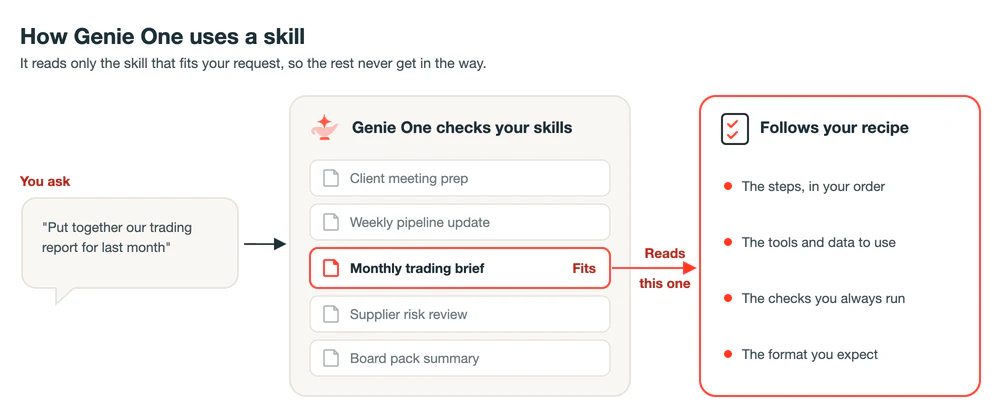
Genie One already understands a lot about your business. Through Genie Ontology, it not only learns your business definitions, but also how your teams use their data. Skills add an extra layer of control: how you like things done. A skill is a workflow recipe that Genie One can follow on demand ensuring a consistent format and output each time. For example, with a skill, users can prompt Genie One to "Put together our trading report for last month", and know that it will return the report the way your team would have prepared it, with the same checks, the same structure and the same level of detail.
Genie One leverages skills when they are either called directly by the user, or when it decides that it's relevant to what you've requested. That means you can keep adding skills, each with as much detail as its task needs, and their guidance stays with that task rather than spilling into your other work.
Skills are durable, reusable assets. A skill is a written record of how your team works, in plain language and in the open Agent Skills format, so it's yours to keep, review and build upon. Publish it through Unity Gateway and the same recipe can be used by any agent that supports MCP, including the coding agents your teams already use. And once it works, share it across your organisation, so one person's best way of working becomes everyone's.
It’s easy to get started with skills. You can build a skill directly in Genie One through one conversation, simply by explaining your workflow in detail once.
When to reach for a skill
You should consider a skill when you find yourself explaining the same thing to Genie One more than once. Good signs include:
- It’s done regularly: a weekly update, a per-client investigation, a per-request ticket, a pre-meeting summary.
- It has steps: pull this, compare it with that, then write it up.
- The format matters: a specific figure always needs to be included, leadership expects a headline first, a table second and risks last.
- There are rules you always apply: what counts as unusual, which numbers to round, how you sign off.
- You keep manually making the same tweak: if every response needs the same tweak, that adjustment step belongs in a skill.
Skills sit alongside the other ways Genie One learns your organisation.
- Your business definitions belong in Genie Ontology. You curate the most important ones in Unity Catalog Semantics, and Genie Ontology combines them with context it learns from how your data is already used.
- Metric views hold reusable, structured metrics, such as how "net sales" or "gross margin" is calculated.
- Pages hold written definitions of concepts and taxonomy, such as what counts as an "active customer" or a "qualified sales lead".
- Domains organise both by business area, such as finance or sales.
- Conventions that apply to every conversation belong in workspace instructions.
- Personal facts, like your role or your reporting currency, belong in memory.
A skill holds the method: the steps, checks and format for a piece of work. Genie Ontology tells Genie One what things mean, and a skill tells it a specific way to get something done.
Skills also work hand in hand with Genie Agents. A Genie Agent is the domain expert for one area of your organisation. It knows the metric definitions, tables, joins and business rules for one scoped domain, such as sales, finance or HR. A skill is the recipe for a specific task: the steps, the checklist and the output format. For example, a sales pipeline Genie Agent knows the pipeline tables, joins and stage definitions. A "weekly forecast risk memo" skill tells Genie One to compare this week's pipeline with last week's, flag deals that slipped and produce a one-page memo. The Genie Agent supplies the domain knowledge and the skill supplies Genie One with the workflow.
Map the workflow before you build
The quality of a skill comes from how well you describe the work. Before you start, walk through the task end to end and answer a few questions:
- Under what conditions should it be used? What would someone say or ask that means this skill applies?
- What tools and data does it use? Which data, Genie Agents, documents or connected tools such as Gmail or Google Drive are involved?
- What order do things happen in? Some steps depend on others, such as confirming which month is complete before pulling its numbers.
- Where does it need to dig deeper? Some steps should repeat until a question is answered, like breaking an unusual result down until it can be explained in one sentence.
- What gets checked every time? Checks cover more than the numbers. They can also be conditions the result has to meet, such as the document always containing a table with the four columns your team expects.
- What should the result look like? Is the output a written summary? An email? A ticket that needs to be filed? The sections, the length, the tone and where it ends up.
- Where do you want a say? Decide whether the skill should go straight to a finished result or pause for you to review, or answer some upfront questions.
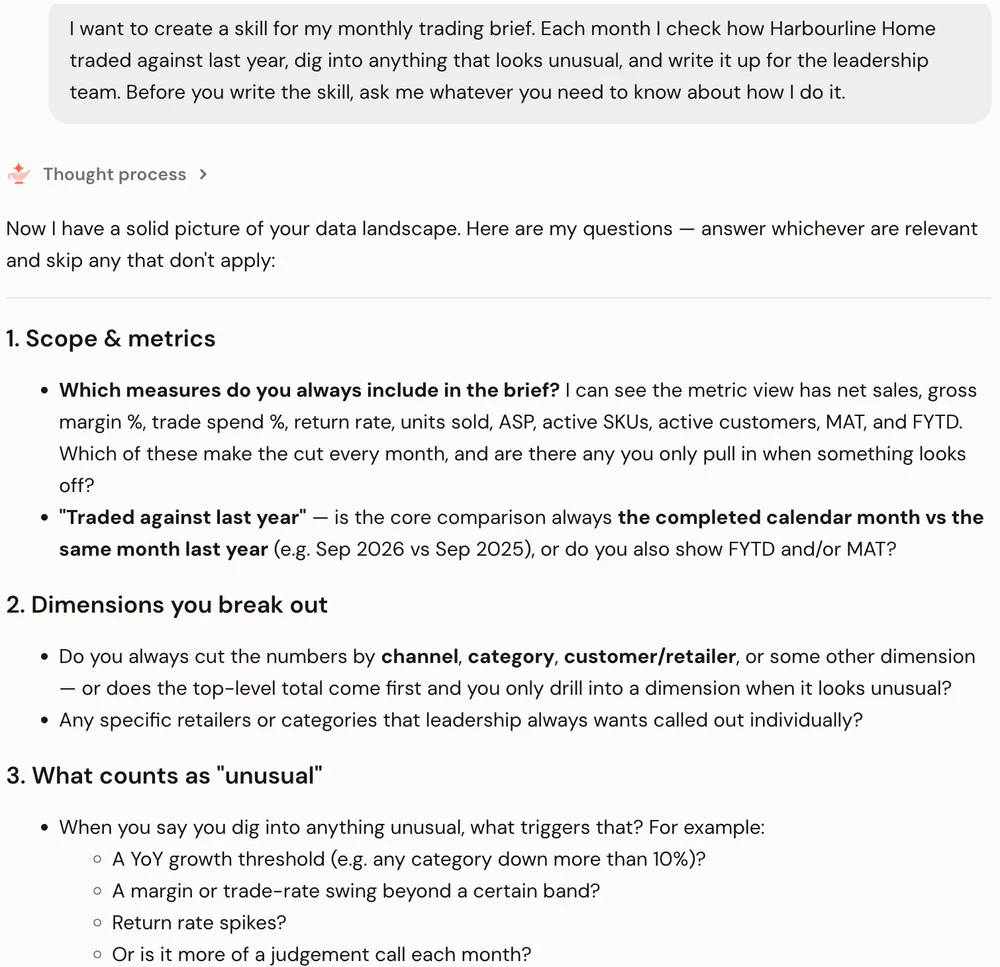
Then hand it to Genie One. Describe the workflow in your own words and ask it to interview you before it writes anything. Genie One draws on what it already knows through Genie Ontology, so its questions focus on how you work rather than what your data means.
Example: building a monthly trading brief
A commercial finance team writes a trading brief for leadership every month. The workflow is simple to describe: pull last month's numbers, check each channel against a few rules, dig into anything unusual, look for emails from the team that explain it, then write a short brief.
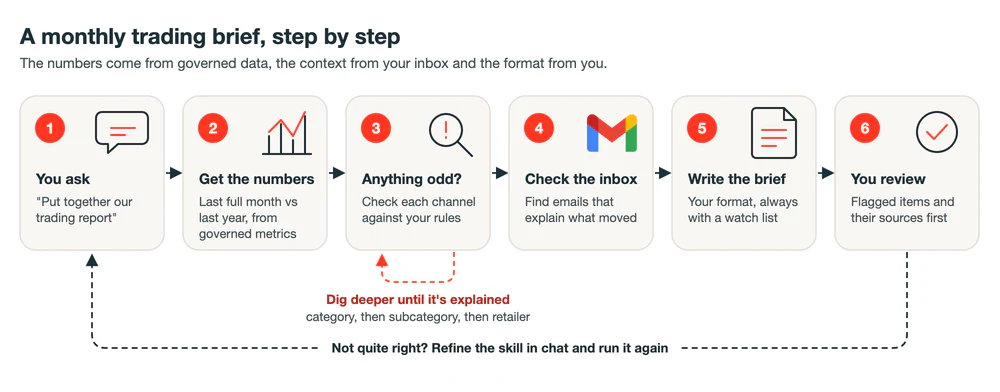
Described in a couple of sentences, that was enough for Genie One to get started. It found the relevant Genie Agent and governed metric view through Genie Ontology on its own, then asked about the method: which measures matter every month, which breakdowns to show, what counts as unusual, what the write-up should look like and whether to pause for review. Answering in plain language was enough for Genie One to write the skill.
Decide how strict each part should be
Judgement is what makes a skill more than a scheduled report. A dashboard or a fixed job does the same thing every time. Genie One can use a skill to make decisions, like choosing the three changes most worth leadership's attention, following an unusual result until it makes sense and explaining it in plain language, the same way you would trust an experienced colleague to.
That doesn’t mean everything should be left open. Some parts need to come out exactly the same every time, whereas others are better left to Genie One's judgement. Be deliberate about which is which. Strict rules suit anything someone else relies on: numbers that are compared over time, a format another team or system expects, the thresholds that decide what gets a closer look and the disclaimers or sign-offs that must always be there.
Conditions are worth spelling out too: what must always appear, and what should happen when something is missing. For example, the trading brief always includes a watch list, even when it only says nothing breached a threshold, because a missing section looks like a missed step.
Small skills, chained together
Because Genie One only reads the skills it needs, it can be advantageous to keep them specific and focused. A skill that does one job well is easier to test, easier to fix and easier to reuse than one that tries to do everything. The real payoff is that small skills can be chained together.
A useful way to think about it:
- Some skills do a task, like producing the trading brief.
- Some skills hold shared know-how, like your team's style guidelines for leadership documents.
- Some skills run other skills in order, like a month-end pack that runs the trading brief, then a cash summary, then puts them together.
For example, from updating the style guidelines skill once, every other skill that uses it picks up the change. Start with one skill, then split it when the instructions start covering two different jobs, or when you notice the same rules being copied into a second skill.
Test it like Genie's first week on a new task
Genie One with a new skill is like a capable new starter: smart and quick to learn, but you check their first few pieces of work to make sure they're delivering what you're looking for. Test the skill the way people will really use it. Ask in your own words rather than by name, and check the result against what you know.
A few habits make testing quicker:
- Keep a golden reference: once a result comes back the way you want it, ask Genie One to save it into the skill as the example to match. It gives Genie One a clear target and gives you something to compare against whenever the skill changes.
- Correct in conversation: say what was wrong and what you expected. Genie One edits the skill and can rerun the work straight away.
- Start a fresh chat to retest: this confirms the updated skill works on its own, not just in the conversation where you fixed it.
Example: putting the skill to the test
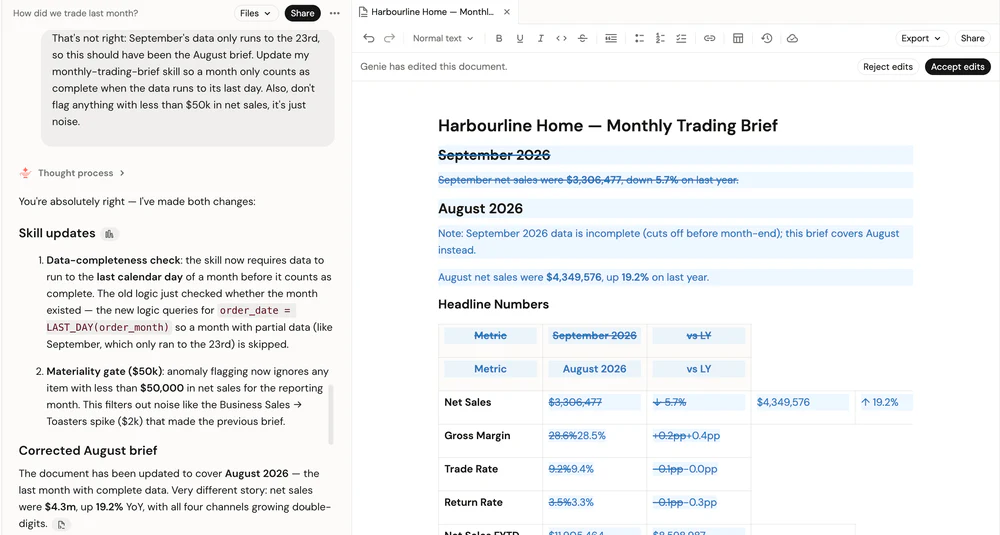
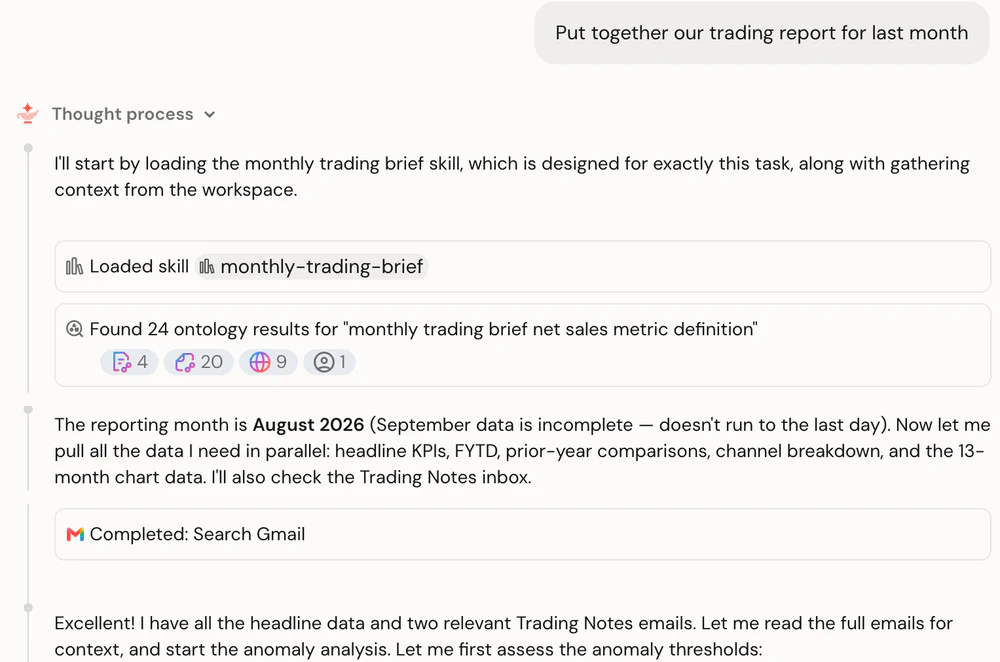
Let's say a monthly trading brief skill has been built. Genie One pulls last month's numbers, flags anything unusual (such as a product line growing much faster than the rest), checks the team's inbox for context and writes up a short brief. On its first run, two things needed fixing. It reported on September while the month's data was still incomplete, and it flagged product lines so small that their movements didn't matter.
Both were fixed in one message. Genie One was told to only report on a month once its data is complete, and to ignore anything under $50,000 in sales. It updated the skill and reran the brief for August, showing every change in the document.
After, Genie One was then retested in a fresh chat. "Put together our trading report for last month" loaded the skill without naming it. This time Genie One reported on August, the latest complete month, and only flagged the two items big enough to matter: a jump in online marketplace returns and a spike in business sales. It searched the team's Trading Notes label in Gmail and found an email explaining each one: a retailer's free returns event and a one-off hotel order.
Govern skills with Unity Gateway
A skill should be managed like any other trusted asset. Unity Gateway Skills (Beta) give your organisation one central place to publish, discover and govern skills. When you publish a skill from Genie One, it becomes a Unity Catalog object, protected by the same permissions, tags and audit as your other data assets. You decide who can use it and who can edit it, there are no copies to keep in sync, and teams can find what already exists rather than rebuilding it.
Share it with your team
Skills start out as your own. When one would be valuable for others in your organisation, publish it through Unity Gateway and share it with the individuals or groups who need it. They can switch it on in Genie One straight away. Anyone you give edit rights can improve the skill for everyone, and anyone else can clone it to make their own version.
Put it on a schedule
A skill that runs on a regular cycle does not need you to ask for it. Create a scheduled task in Genie One and point it at the skill, for example "Run the monthly trading brief on the first working day of each month." The results arrive in a chat thread and by email. If the skill normally pauses for your review, tell it what to do on scheduled runs, when nobody is there to answer.
Explore the details
You don't need to open a skill to use one, but it helps to know what is inside. Every skill Genie One writes is saved in your workspace as a folder with a SKILL.md file, and you can find all of yours under Customizations > Skills in Genie One. Each skill starts with a name and a description, which is what Genie One reads to decide when the skill is relevant. Supporting text files, such as templates or a golden reference, sit alongside it and are read only when a step needs them.
The instructions that follow are plain language. This part of the trading brief skill sets out the document Genie One produces, with judgement for "What moved and why" and a watch list that must always be present.
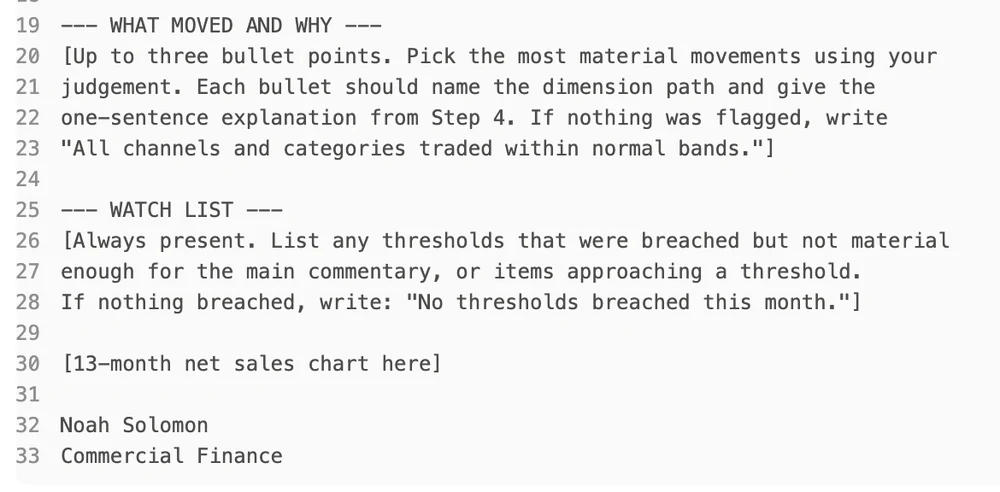
You can edit a skill directly, or choose Edit with Genie. It’s worth reading what Genie One wrote, even when it works. Every line is an instruction it will follow each time, and reviewing it is the quickest way to spot a rule or step you didn't mean to include, or find something new to add in.
Write down your first skill recipe
Genie One already knows your business. Skills teach it how you work. Every skill you write is one less process that lives only in someone's head. Pick one task you explain more than once, map it out, build it with Genie One and test it until it comes back the way you would have done it yourself.
Text: Open Genie One and describe a task you do every month, then ask it to help you turn it into a skill. Learn more about user skills in Genie One, Unity Catalog Semantics and Unity Gateway Skills.
来源: Databricks Blog · databricks.com