Introducing Genie Migrate for Serverless
Introducing Genie Migrate for Serverless
Databricks releases Genie Migrate for Serverless (Beta), to migrate jobs and notebooks from classic clusters to serverless computing, achieving automated migration through a three-step process of scanning and classification, code change preview, and reversible application, supporting an 8k context window, requiring user approval for each change, and allowing one-click rollback in case of migration failure.
Serverless compute in Databricks offers a simpler, faster way to run your data and AI workloads. It removes the operational burden of managing infrastructure, automatically handling provisioning, scaling, and optimization so teams can focus on their business outcomes. With serverless, organizations can move faster, improve efficiency, and unlock the benefits of cloud-native compute without managing and maintaining complex clusters.
Our serverless usage has grown multifold just in the past year, and today thousands of customers run notebooks and jobs on it. Most teams still have a classic fleet they want to migrate over to the serverless world in order to get the cost and operational benefits without managing infrastructure themselves. The work of moving each workload one at a time often prevents our customers from unlocking serverless benefits for their existing workloads.
You have probably watched this happen. You pick a job, flip it to serverless, and then get hit with an error, an access-mode incompatibility, a Spark config that does not apply, a library that is installed on classic but not on serverless. What should take an afternoon stretches into weeks, and most of the time goes to translation you have done many times before.
Not any more! Today we are excited to announce the launch of Genie Migrate for Serverless (in Beta), the Databricks agent that migrates your jobs and notebooks from classic to serverless compute - easily and effortlessly. A workload migration becomes a review-and-approve step rather than a research project.
Migration used to live in the practitioner's hands
Until now, migrating a workload to serverless was manual. The knowledge of how a classic cluster config maps to serverless, which libraries resolve, which Spark confs still apply, and which access mode a workload needs lived in the practitioner's head and in the trial-and-error of running the notebook or job and reading the failure.
Genie Migrate for Serverless moves that translation off you and onto the platform, the same way serverless moved provisioning and scaling onto the platform. What stays with you is judgment: whether to migrate a workload now, whether the proposed changes look right, and whether the migrated run is healthy. The agent handles the translation itself, proposing as a diff you review before anything changes.
In order to build successful serverless migration tooling, we kept these critical principles in mind:
- No broken production: a silent regression on a business-critical workload is worse than no migration at all, so the agent first assesses each workload and flags what is safe to move.
- Control over every change: the ability to see what will change and what will not, to accept or reject each proposed edit, and to trust that nothing touches code you did not approve.
- A clean revert: if the serverless run goes wrong, a way back to the pre-migration state in a few clicks.
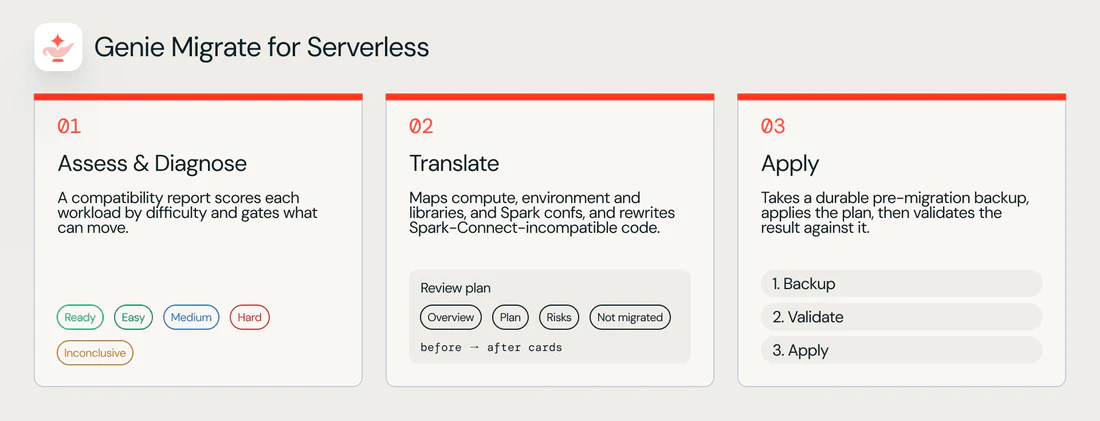
Those three needs shape how the migration agent works, and the workflow below defines how it executes the migration: assess what can move, translate it, and apply the change reversibly.
What Genie Migrate for Serverless does
- Assess: scan your jobs and classify a fleet so you know what can move today, what needs an admin, and what is not ready for migration yet.
- Translate: propose the infrastructure and code changes a workload needs for serverless, each as a labeled diff (a side-by-side view of what changes and what stays the same) you review.
- Apply (reversibly): validate the translation and apply it without preempting a running workload, keeping your original workload intact so you can revert if the serverless run is not healthy.
The agent runs from the /compute migrate slash command inside Genie on any job or notebook. It is fully managed, and you need no setup to start scanning. Because Databricks manages it, the agent reads your job config and workload code inside your own workspace.
Let’s dive a bit deeper into each of these areas listed above.
Assess
Before you touch anything, the agent scans your Jobs and Notebooks and marks each workload with its serverless readiness. You see which workloads are ideal candidates for migration instead of auditing the fleet by hand - eliminating painstaking manual discovery and triage work
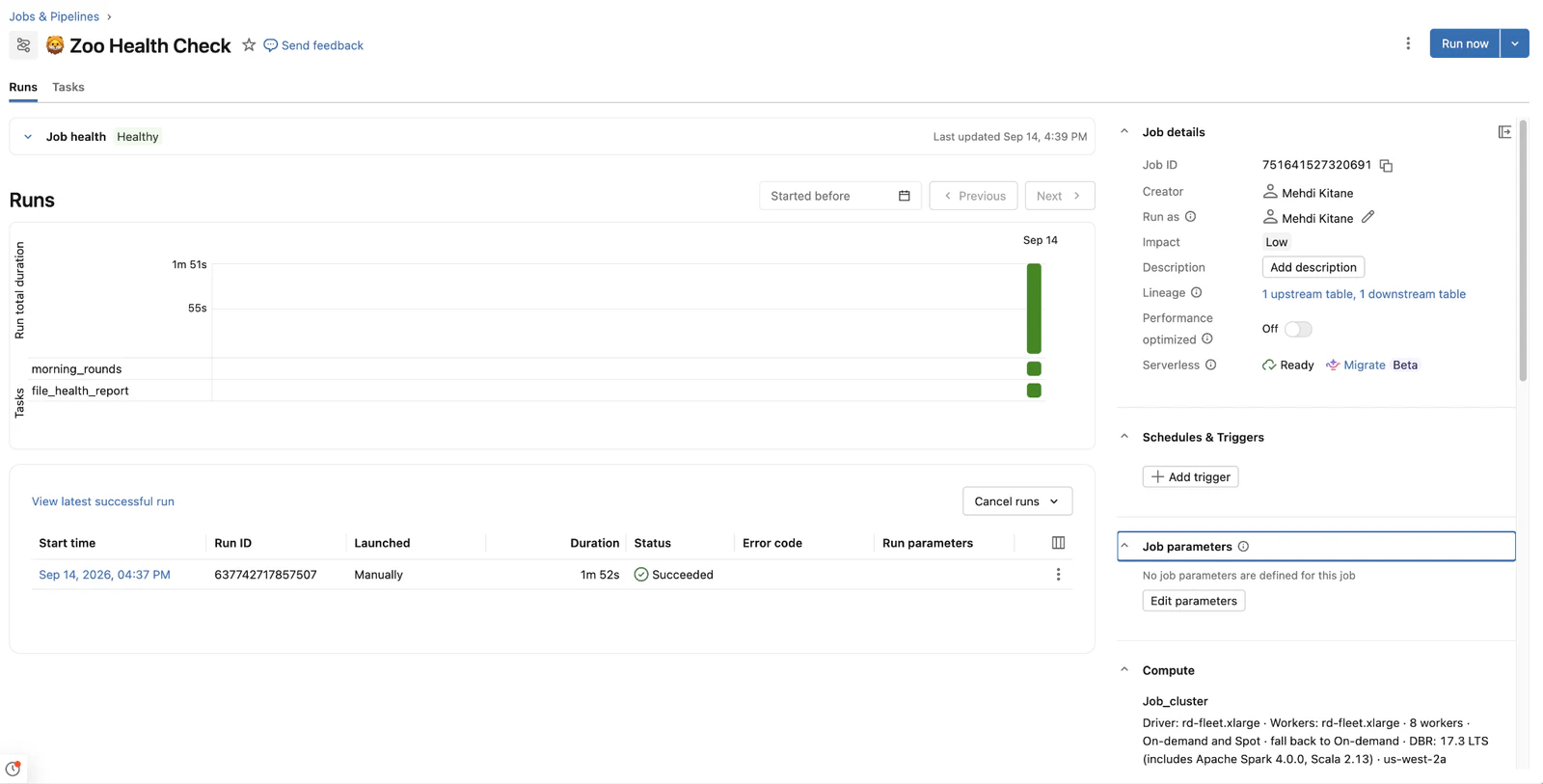
A quick note on external sources: if a workload's source of truth lives outside the workspace, for example a job managed by Databricks Asset Bundles or a notebook in a Git folder, the agent cannot migrate it yet. Support for those is coming soon.
Translate
Once you pick an eligible workload, the migration agent proposes the changes it needs for serverless and presents them for review before anything is written. Nothing is applied until you approve it.
The migration agent effectively translates the pieces that differ between classic and serverless:
- Compute configuration: the classic cluster config maps to a serverless compute selection.
- Environment and libraries: the library list is resolved against the serverless runtime, and the environment definition is synthesized for serverless.
- Spark configurations: confs that still apply are carried over, and confs that do not are surfaced for you to decide on rather than removed silently.
- Workload code: where the code uses patterns that do not run on serverless, such as APIs incompatible with Spark Connect, the agent rewrites them and shows the change as a diff.
Every change, including the code rewrites, is presented as a reviewable diff. Before applying, the agent shows a side-by-side comparison of what will change and what will not, an explicit contract you can hand to a manager or an on-call rotation.
Check out the latest demo on how to migrate classic workloads easily using Genie Migrate for Serverless.
If the agent is unsure about something, for example whether a Spark conf is still needed, it reports the conf rather than removing it. A conf can look unused to a static scan while a listener loaded at runtime depends on it. Silent removal would drop the telemetry a team relies on. The agent leaves that decision with you.
Apply
Applying a migration is where you are most exposed, so Genie Migrate for Serverless is most conservative here. It performs deterministic checks for correctness today, and deeper runtime validation is coming next.
- Validation before Apply: the agent checks that the translation is coherent, that library dependencies resolve against the serverless runtime, and that the configuration applies cleanly, so that failures surface before the workload runs rather than during tomorrow's SLA.
- A watched first run: because changes are applied to a cloned job, you can run the clone once on-demand to confirm it is healthy on serverless before you promote it onto your original job. The first serverless run then happens under your eye rather than unattended.
If you opt not to migrate, cloned jobs or suggested changes to notebooks will not be applied.
One thing to be cautious about: this does not undo data that serverless runs wrote to production tables in the meantime if you tested with the changed versions.
Today the validation is static. It confirms the translation is sound without running the workload, and it is honest about what it has and has not proven. The deeper check is coming next via Sandbox validation. With this, the agent will be able to run the migrated workload in an isolated sandbox without affecting your production tables and compare its output against the classic baseline – so you see a runtime and correctness signal on a critical job before Apply, not after.
Migrate jobs in bulk
Migrating one workload at a time in Genie works well for a handful of jobs. For a larger fleet, you can run Genie Migrate for Serverless in the background with the Databricks CLI. Start a migration for multiple jobs from a script using the compute-migrations command group, and the agent builds a serverless working copy of each job without an open Genie session. Your original job does not change until you review and approve its migration, and approving keeps the job's ID, schedule, and permissions. Bulk migration supports jobs today (support for notebooks coming soon) and requires Databricks CLI version 1.24.0 or above.
The full picture
Let’s put the three key capabilities of the Genie Migrate for Serverless back together:
- Assess: identifies and classifies the eligibility of jobs for serverless migration across the fleet.
- Translate: proposes infrastructure and code changes as labeled, reviewable diffs.
- Apply reversibly: performs deterministic validation today with sandbox validation coming next.
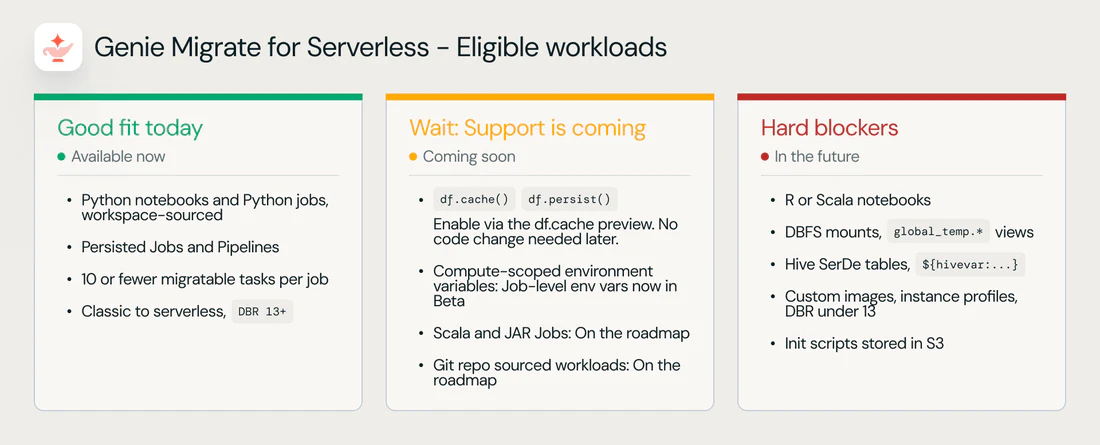
Here is a quick summary of what workloads are good fit today to migrate using the agent, and what’s coming in the future.
Get started today
You can start moving workloads to serverless today using Genie Migrate for Serverless. Here is how to get going:
- Turn on the beta: enable Genie Migrate for Serverless in your workspace preview settings, then run
/compute migratein Genie on a job or notebook to scan what is eligible. - Pick a low-risk workload first: migrate a non-critical job or notebook to build confidence in the flow before you touch anything business-critical.
- Review before you apply: read the what-will-change and what-will-not panels, and accept or reject each proposed change.
- Watch the first serverless run: confirm the migrated workload runs healthy; your original stays intact so you can revert if it does not.
- Work outward from there: migrate the rest of the eligible fleet, and use the admin-action-needed banners to unblock the workloads that need setup.
The Genie Migrate for Serverless is available today via the /compute migrate command in Genie, on any job or notebook. We are actively shaping the sandbox-validation capability with preview customers, and we continue to evolve the agent to make serverless migrations faster, simpler and easier.
Learn more:
Source: Databricks Blog · databricks.com