现在您可以并行探索任何想法,而无需触碰正在运行的内容
Now you can explore any idea in parallel without touching what's live
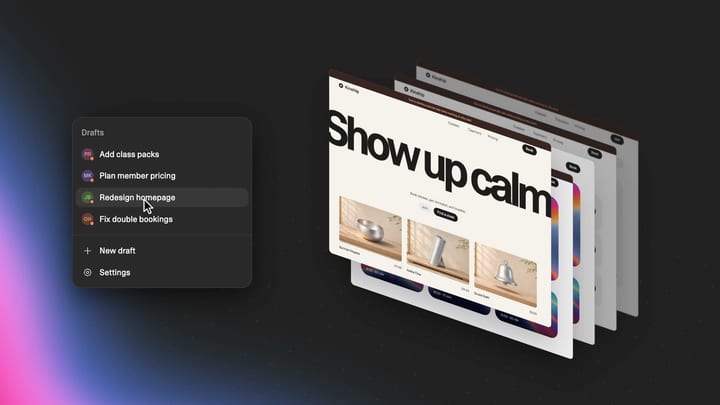
The best builders experiment, tinker, and tweak. Now you and your team can try different ideas in parallel and see how they'd really look in the wild before choosing your favorite, while your live app stays untouched.
With drafts, you can copy your whole app, from design to database, as often as you like. Each draft has its own chat and preview, so you and your team can work on separate versions and compare them side by side. Nothing goes live until you accept a draft and hit publish.
Here's what that means for you:
Bring your people in without losing control
Let a teammate or a client make changes in their own draft without altering the existing app. Review each draft and choose which changes to keep.
Our sales teams have been building their own tools with Lovable, from the Sales hub where we manage our sales pipeline to our demo library. Drafts let us try a few ideas at once and see how each one actually works with real-looking data, without risking the progress we've made or interrupting work in another part of the app.
Explore multiple ideas at once
Try out different ideas and keep what works. Every draft comes filled with example data, so instead of an empty page you see your idea with a busy booking calendar, a full order history, or a long list of sign-ups. You can even ask Lovable to spin up different versions for you and keep the ones you like.
Make changes safely
Build and test changes on a full copy of your app, including its own backend when needed, before putting them in front of real customers. Try a new field on your sign-up form or a members-only page, without test entries landing next to real customer data.
OLX runs online marketplaces across 7+ countries. We use drafts to test different features, layouts and UX side by side, then keep what works best. We can explore as much as we want without worrying about what's already live.
Examples of what you can do
Now that each draft is a full copy of your app, backend included when needed, you can easily explore any new idea for your app, for example:
- A new field on your sign-up or booking form
- Who can see what, like a members-only page or an admin view
- A new dashboard, seen with months of example data
- New tables and records, without test entries landing next to real user data
- Deposits, a waitlist, or a new booking flow, visualized with a full example calendar
- Fresh layouts, images, videos, and sharper copy
How it works
Open a project, click its name at the top of the editor, and hit "New draft." Lovable creates a complete copy of your app, from design to database. To edit the draft, just start prompting. You can create as many drafts as you like.
When you're happy with a draft, hit accept to add its changes to your project, then hit publish to make them live. Any data you add while testing stays in the draft and is cleared when you accept or delete it, so it never lands next to real customer data.
Changed your mind? Before you accept, just delete the draft. After you accept, you can still roll it back before you publish: open History, pick the version from before you accepted, and hit revert.
来源: Lovable Blog · lovable.dev