Claude Watermarks Your Words, and You Can’t Check Them (Yet)
Claude Watermarks Your Words, and You Can’t Check Them (Yet)
Claude now embeds hidden watermarks in almost all generated text, Anthropic officially states this is in response to the EU AI Act requirements. Currently, only large AI companies and their approved organizations can check this watermark, the public still cannot verify it. Other companies like Google and OpenAI have also adopted text watermarks, but similarly do not open detection tools to the public.
I love using AI as a writing tool. But like I wrote in “Why Does AI Write Like Yoda?,” it’s not because AI is a good writer. In fact, it’s pretty bad at writing, and I edit absolutely everything it generates, so the end result is basically unrecognizable compared to what it created. Unfortunately, just because AI is, on average, a pretty lousy writer, that doesn’t stop people from using AI to write all sorts of things that people end up reading, and that’s how we end up with slop.
That’s where watermarking comes in. If AI-written text carries a hidden signal that a machine can pick up, someone could build slop filters with it and add a little friction to mass-producing AI text and stuffing it into every nook and cranny of the internet and, maybe, manage to keep some spaces on the internet for people. (Anthropic and OpenAI give a more official reason: the EU AI Act now requires them to mark AI-generated content in a way machines can read. I don’t know how they feel about slop.)
The upshot is that almost everything Claude writes now carries a hidden watermark. A slop filter needs a way to check for the watermark. And, unfortunately, for the time being, only the big AI companies and a few organizations they’ve approved can check for it.
Anthropic’s support page on marking AI-generated content now reports all of its newest models, and some older ones, watermark their text on every surface where you can use Claude, worldwide. (Bruce Hopkins covered what Anthropic announced here on Radar.) Google has used a text watermark in its Gemini app since 2024, and in October OpenAI announced it’s adding one to ChatGPT and Codex text in the EU. But none of those companies lets the public check text with its detector. (Google’s synthid.com lets anyone check images, video, and audio for its watermark, including images made with ChatGPT, but it won’t let you check text from any AI lab.)
I’ve read articles about watermarking, but I didn’t really know much about how it worked. So I did what any good developer would probably do: I took a shot at reasoning about it, and I came up with what I thought was a plausible way watermarking could work, based on what I know about how large language models work. And, strangely enough, it turned out I was basically right, and not because I’m some sort of amazing genius. It’s because watermarking is actually pretty straightforward, and if you know how the output part of an LLM works, you can probably design a decent watermarking system yourself.
The reason I’ve got such a big interest in how models work right now is my next O’Reilly book, a deep dive into how models work called Be the Model, which we’re planning on releasing early next year. I’ve spent a lot of time over the last year thinking really hard about how to explain the internals of LLMs, and it turns out that you don’t need to understand most of the parts inside a model to see how watermarking works. All you need is the very tail end.
So let’s try an experiment. I’m going to describe the relevant bits of how models work, and then, before I explain how watermarking works, I want you to take a guess and see how close you come.
The only part of the model you need
There’s a lot of stuff that happens inside a model. You’ve probably heard of transformer blocks, and you might know what a context window is. That’s all part of the whole machine. But at its core, a model is a next-word-predicting machine: You feed it a bunch of text as context, and it predicts the next word. The part that matters for watermarking is what goes into that machine and what comes out.
What goes into the machine is tokens. We all know that when you pay an API bill, you pay some number of dollars per million tokens, but we don’t always explain what a token is. Remember when people discovered that AIs were really bad at counting the r’s in the word strawberry? Part of the reason for that is that the AI never sees letters. It only works with numbers.
Every model has a fixed vocabulary of tokens, which are every word and piece of word it knows, and each token has a number called its token ID. On the way into the machine, a tokenizer splits your text into tokens and replaces each one with its ID. For example, if you ask GPT-2 (an early LLM created by OpenAI in 2019) “how many r’s are in strawberry,” its tokenizer turns the word strawberry into a single token, number 41236. The model gets that number, not the letters s-t-r-a-w-b-e-r-r-y, so it doesn’t have any actual letters to count.
Common words usually get a token of their own. But a word that isn’t in the vocabulary gets split into smaller pieces that are, which is how a tokenizer can handle any text you give it. GPT-2’s vocabulary has a token for "strawberry" with a space in front of it, but not for "strawberry" without the space. So if strawberry is the very first word of the text, with no space in front of it, the tokenizer splits it into three pieces that are in the vocabulary: st, raw, and berry.
GPT-2 has 50,257 tokens in its vocabulary. If you have Python and install the Hugging Face transformers library, you can check GPT-2’s vocabulary size and strawberry tokens with this command:
python3 -c "from transformers import AutoTokenizer;
t=AutoTokenizer.from_pretrained('gpt2'); print(len(t));
print(t.tokenize(' strawberry'), t.tokenize('strawberry'))"
If you don’t have Python or don’t feel like installing transformers, you can go to ChatGPT, Claude.ai, or Gemini and paste that command in, and they’ll (probably) install the library and run it for you. It should print 50257, then ['Ġstrawberry'] ['st', 'raw', 'berry']. The Ġ is how this tokenizer writes the space. (If you don’t have PyTorch installed, you’ll see a warning about it first, which you can ignore.)
The token IDs go into the context window, which is just a big array of numbers, and then the AI does its thing. The context window contains every token the model sees when it’s making its next-word prediction. If you’re using a chat, it usually includes the whole conversation so far (your earlier prompts and the AI’s earlier responses) plus any instructions or files the chat app adds behind the scenes. When you send a new message, it typically gets added to the end of the context window, as does every token the AI writes in reply, so the window keeps growing as the conversation goes on (up to a size limit, at which point the app has to compact or drop older parts of it).
What comes out the other end of the machine is a probability for every token in the entire vocabulary: the model’s estimate of how likely each one is to be the next token, with all of them adding up to 100%.
The model’s job ends at the probabilities, and it never picks a word. Picking the next token is the job of a separate program called the inference runtime, or runner. The runner can take the most likely token every time, or it can roll the dice and pick a token at random, giving each one a chance that matches its probability. We’re used to thinking of AI as nondeterministic: give the same AI the exact same prompt 10 times in a row and you’ll get 10 slightly different answers, sometimes wildly different answers. That randomness is all done in the runner. Give the model the same context window and it produces the same probabilities. Then the runner adds the token it picked to the context window and runs the model again to get the next one.
Can you guess how a simple watermark works?
If you wanted to hide a pattern in an AI’s text that you could detect later, and all you could touch was the probabilities or the runner’s dice roll, how would you do it?
Here’s what I guessed. I’d divide the tokens into two groups, then I’d nudge up the probabilities for one group and nudge down the probabilities for the other. Then, since I’d know which tokens are in the favored group, I could do some pretty basic statistical analysis to figure out whether they show up more often than they should, and if they do, the text is probably watermarked.
That turns out to be a real, well-known watermark called the green list method, from a 2023 paper by John Kirchenbauer and his colleagues at the University of Maryland, “A Watermark for Large Language Models.” They called the favored group a green list, and the rest of the vocabulary a red list. Right before it picks, the runner gives every green token’s probability a boost. The red tokens never get touched, but each one’s share goes down, because the probabilities still have to add up to 100%.
Here’s an example. Say a tiny model only knows five words (cat, tree, the, by, and sat), and it has just read the word the, so it’s predicting the next word. The first probability column shows the probability the model gives each of its five words. Now say tree and by are on the green list for this spot, so the runner boosts those two before it picks. The second probability column shows the probabilities after the boost:
| next word | probability before | probability after the boost |
| cat | 56.3% | 37.9% |
| tree | 20.7% | 37.9% |
| the | 12.6% | 8.4% |
| by | 7.6% | 13.9% |
| sat | 2.8% | 1.9% |
Tree is now tied with cat. The model produced the same probabilities as before, and the runner boosted two of them after the model was done.
My guess missed an important detail, though. The green list can’t be the same every time the runner picks a token. If it were, the same favored words would show up all over the text, and anyone who read enough of it could work out which ones they were. So the runner determines the green list for each token using a secret key mixed with the token right before it. To check for the watermark, take each token in the text, use the key and the previous token to rebuild its green list, and check whether the token is on it. If the green list is half the vocabulary, you’d expect about half the tokens in ordinary text to be green by chance. In watermarked text, a lot more of them are green. A statistical test tells you how unlikely it would be to get that many green tokens by chance. You don’t need the model to check, just the key and the tokenizer.
SynthID: What Claude actually uses
Anthropic says Claude’s watermark is a version of SynthID-Text, a method Google DeepMind published in Nature in 2024 and uses in its own Gemini app. It works in the runner, just like the green list, but it gets the pattern into the text a different way. Anthropic describes it as a watermark that “only changes the source of the randomness used to pick among words.” So my guess was a real method, but Claude uses a different one.
Here’s the basic idea. Instead of boosting some words’ probabilities, the runner rolls its dice a few times, so it ends up with a few candidates for the next word. Then it flips a coin for each candidate. Whether the coin comes up heads or tails depends on the secret key, the candidate word, and the few words right before it, so anyone with the key can flip the same coin later and get the same result. The runner writes a candidate whose coin came up heads. If every candidate is the same word, there’s nothing to choose between, so the watermark only gets into the spots where the model had a real choice.
To check a text, a detector with the key goes through it word by word, redoes each coin flip, and counts the heads. Ordinary text comes up heads about half the time, and watermarked text comes up heads more often. The real detectors do more than count, but that’s the idea.
That’s kind of involved and hard to picture from a description alone. Luckily, I’ve got a better way for you to understand how watermarking works.
Be the Watermark
I mentioned that my new book, Be the Model, will be out next year. It starts from the fact that AI tools have gotten incredibly sophisticated, even the web chats like ChatGPT and Claude.ai. They can run Python code for you, and they can write an entire interactive HTML page from a single prompt. So why not use them as learning tools?
That’s one of the main ideas behind the book. You’ll use AI tools to create web pages (which I call “toys”) that let you play with different parts of LLMs, and that helps you get an intuitive feel for how they work. The toys let you literally do part of the job that a model does, so you learn how a model works by being the model.
Each toy starts with a short prompt and a picture of what the page should look like. I figured that for this article, you could build a toy to Be the Watermark. I think this is actually a good way to get a feel for how SynthID actually works.
Save the picture below, then copy the prompt under it, and paste them both into a fresh ChatGPT or Claude.ai chat. (In the book, you aren’t handed canned prompts; you come up with most of them yourself.)
Once the AI finishes building it, you’ll have a page with a short story and a secret key, 3 1 4 1 5. Most of the words in the story have a dropdown with near-equivalent words, like creek, pond, lake, and pool. Click Run, and the page checks the story the same way a detector does. It goes through the story one word at a time and flips each word’s coin. To flip the coin, it multiplies the token IDs of that word and the four before it by the five key digits, adds them up, and calls it heads if the last digit is 5 through 9. (In the toy, a word’s token ID is just its position in an alphabetical list of every word on the page.) In the picture, the page is checking creek. The five words tabby, rested, by, the, and creek have token IDs 62, 48, 8, 63, and 11. Multiplied by the key digits 3, 1, 4, 1, and 5, that’s 186 + 48 + 32 + 63 + 55 = 384, and the last digit is 4, so creek comes up tails. Then the page counts the heads. The starting story comes up heads on 14 of its 32 coin flips, which is about half, so the page shows “No watermark found.”
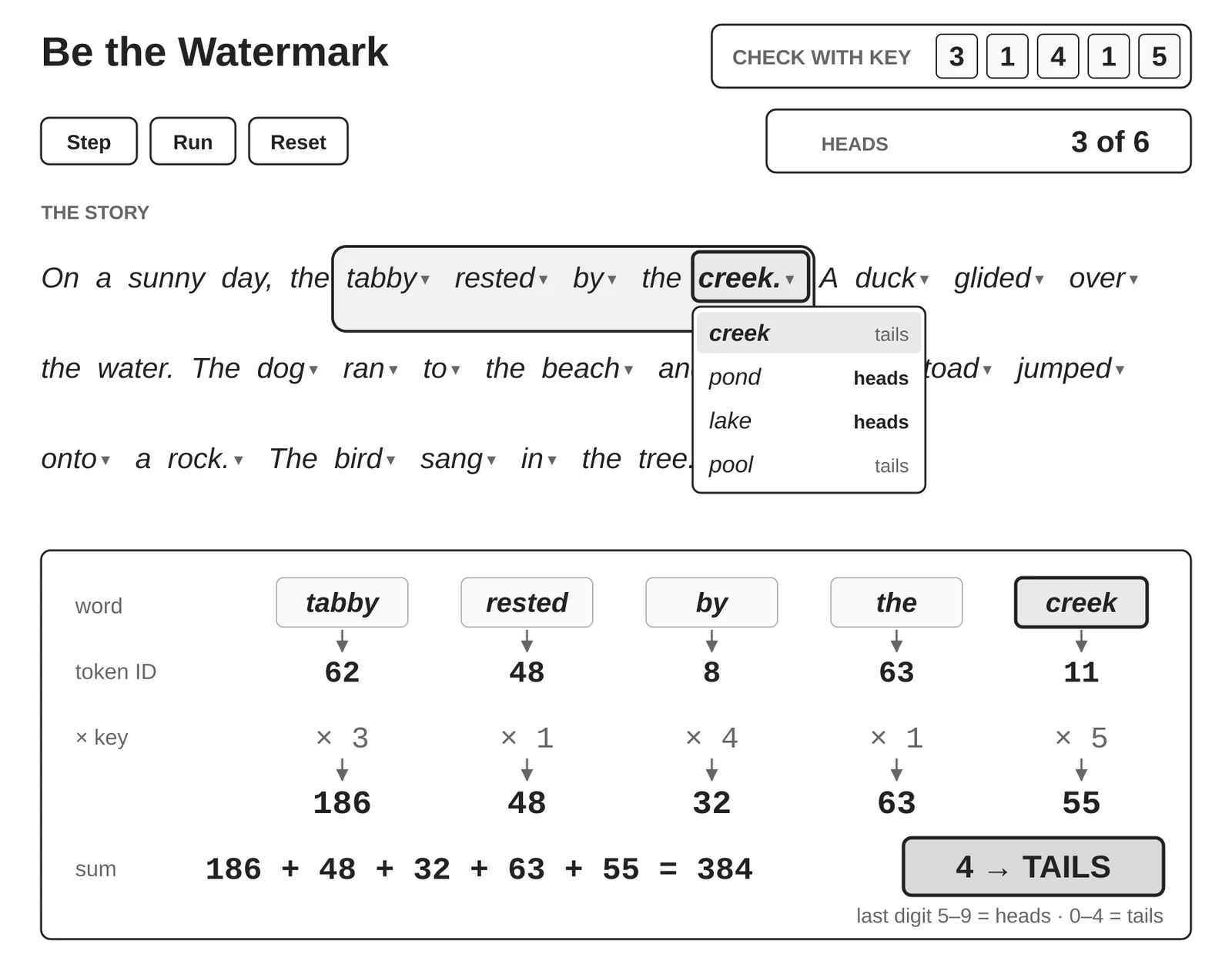
Build one HTML page with a white background that works like the attached picture. Make all of the text, including the button labels and the key digits, a dark color with high contrast against its background. A word’s token ID is its position, counting from 0, in an alphabetical list of every different word in the story and the dropdowns. Ignore case and punctuation.
The story starts: On a sunny day, the tabby rested by the creek. A duck glided over the water. The dog ran to the beach and barked. The toad jumped onto a rock. The bird sang in the tree.
Each word after the first four that’s in one of these groups gets a dropdown with its group: cat/kitten/kitty/tabby, sat/rested/waited/stayed, by/beside/near, pond/lake/pool/creek, duck/goose/swan, swam/paddled/floated/drifted/glided, across/over, dog/puppy/hound/pup, ran/raced/dashed/hurried/rushed, to/toward, shore/bank/beach, barked/yapped/growled/howled, frog/toad, jumped/hopped/leaped/sprang, onto/upon, rock/stone/log, bird/robin/sparrow/wren, sang/chirped/tweeted/whistled, in/from, tree/oak/elm/maple. In an open dropdown, every option shows whether its coin comes up heads or tails in that spot with the current key; a closed dropdown shows just the word.
The coin flip is the sum in the picture: the key digits times the token IDs of the four words before and the word itself. If the sum’s last digit is 5 to 9, it’s heads; 0 to 4 is tails. Check the story one word at a time, starting with the fifth word, animating each product and the growing sum, highlighting the word and the four before it, and counting the heads. A full run takes about 10 seconds. When the check finishes with at least 60% heads, animate a checkmark badge reading “Watermark detected” beside the heads count; otherwise show “No watermark found.” Changing the key or a word clears the heads count. Use only Step, Run, and Reset buttons. Reset keeps the key and the words.
Your job is to be the watermark. When you open a dropdown, it shows whether each word in it would come up heads or tails in that spot with the current key. Swap some tails words for heads words and run the check again. When at least 60% of the coin flips come up heads (20 of the 32), the page shows a “Watermark detected” badge. Every time you pick a heads word from a dropdown, you’re doing the runner’s job. The one difference is that the runner can only choose among the few candidates its dice rolls turned up, so sometimes there are no heads word to pick.
It’s a little harder than it seems because when you swap one word, it changes the coin flips for the next four words too. Each word’s coin flip uses that word and the four words before it, so the word you just swapped is part of the next four sums, and any of those coin flips can come out differently. A few things to know:
- A swap never changes the coin flips for words before it, so it helps to work from left to right, the same way the runner writes.
- A swap can cost you a heads on a word that doesn’t have a dropdown, like the or water. The only way to fix one of those is to change a word before it.
- If you go back and change an earlier word, some of the words you already picked might now come up differently, so check the dropdowns again.
See if you can get the page to show a watermark for your story.
Once you get the badge, change the last digit of the key to 6 and run the check again. Your heads count will probably drop back toward half and the watermark badge will disappear, even though the watermark is still there, because the page is checking with the wrong key. (A story can still pass with the wrong key by chance.)
You’ll also notice that the first four words, “On a sunny day,” don’t have dropdowns, and the check doesn’t start until the fifth word. A coin flip needs a word and the four words before it, so the first four words don’t have enough words before them to flip a coin.
If you want to see the math for a particular word, ask the AI that built the page how it calculated whether that word comes up heads or tails. It should walk you through the token IDs, the key digits, and the sum. And if the animation feels slow, you can ask it to redo the page so the animation runs faster. To get the original story back, reload the page.
The toy’s vocabulary has 75 words, and 48 of them, like pool and puppy, don’t show up in the starting story. They’re the near-equivalent words in the dropdowns. A real model’s vocabulary works the same way because it’s fixed ahead of time and any one passage uses only a small part of it.
A story this short also shows why real detectors work better on longer text. With 32 fair coin flips that don’t affect each other, you’d get at least 60% heads about one time in 9, so a badge on a story this short doesn’t prove much. Over hundreds of words, the odds of that proportion of heads by chance get very small.
The toy is a lot simpler than the real thing. Real token IDs aren’t alphabetical. Real SynthID uses a much bigger key, mixes the key and the words together with a hash function instead of a sum, and plays several rounds of coin flips for every word instead of one. And its detectors weigh those rounds differently and are trained on watermarked and ordinary text for each key, instead of just counting heads.
Why you can’t check it yet
You just did the thing the AI companies are worried about. With the key, you could see which words came up heads and swap them, and the same trick works in the other direction: Someone with the key could strip the watermark out of AI text or write text that’s heavy on heads on purpose and make something a person wrote look like Claude wrote it. If the companies made their keys public, someone could easily write a watermark detector for your favorite text editor that fixed the text to remove the watermark, and that would defeat the whole purpose.
That’s likely why they keep their keys to themselves, and why right now only they and a few organizations they’ve approved can check for the watermark. I don’t know whether or not I agree with that reasoning, but I can understand that the issue is complicated. In the meantime, I’m applying for access to Claude’s detector (hence the “yet” in the title of this article).
Source: O'Reilly Radar · oreilly.com