Running the full server-side Datasette Python app in the browser with service workers and Pyodide
Running the full server-side Datasette Python app in the browser with service workers and Pyodide
17th November 2026
Datasette Lite is my port of the Datasette Python application to run directly in the browser using WebAssembly and Pyodide. I’ve released a complete rewrite of Datasette Lite using service workers, and it’s now almost indistinguishable from the real server-side application.
You can now do all of the following, using a carefully crafted URL to lite.datasette.io:
- Load client-side Datasette to browse any SQLite database, JSON file, CSV file or SQL script
- Select a released version of Datasette to load from PyPI
- Load a specific commit, tag, or branch name from the Datasette GitHub repository
- Pick from over 100 versions of SQLite to use with Datasette
- Install additional Datasette plugins from PyPI or URLs to wheel files, including JavaScript visualization tools
The ability to load specific Datasette references, plugins, and SQLite versions makes this a fantastic tool for linking to demos of work-in-progress features or bug reproductions, without needing to spin up a full web server to serve that demo.
As an example, consider the following URL:
Follow that link and, after a short loading screen, you’ll find yourself on a page that looks like this:
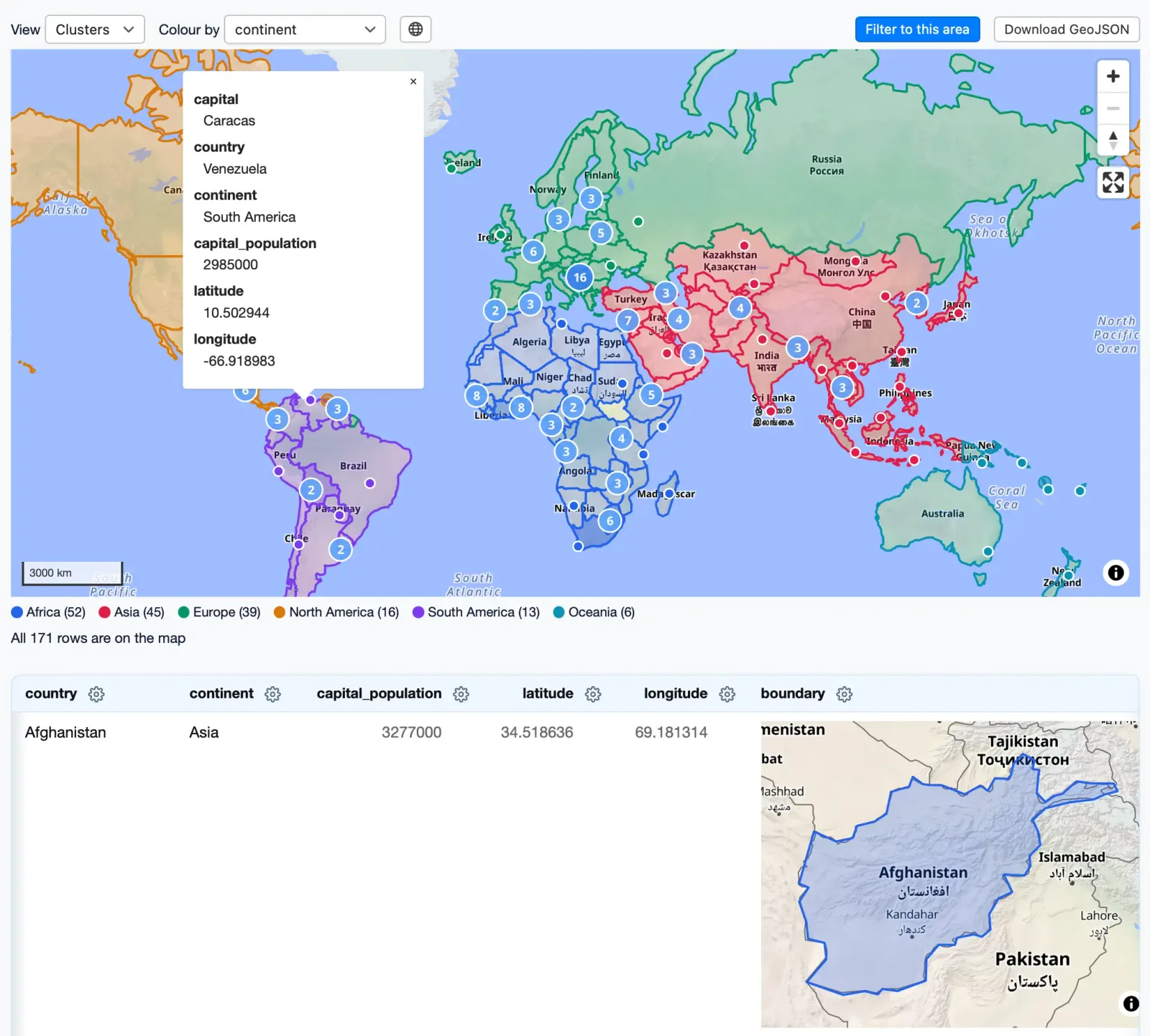
That’s Datasette running the new datasette-maplibre plugin, loading up a database of GeoJSON shapes of countries and displaying both a combined map and individual boundary maps in a table.
Let’s break down that URL to see what it’s doing:
https://lite.datasette.io/
  ?install=datasette-maplibre
  &url=https://.../demo.db
  &metadata=https://.../metadata.yml
  #/demo/capitals_and_countries%23map=0/4.2/180&color=continent
The ?install=datasette-maplibre installs that additional plugin from PyPI. You can pass &install=... as many times as you like to load more plugins.
&url=https://.../demo.db loads that SQLite database from the provided URL. These URLs need to have open CORS headers—I host files like this in Gists, because they provide an easy way to get open CORS headers on a web-hosted file.
&metadata=https://.../metadata.yml loads this metadata.yml file. The metadata file adds HTML descriptions to various tables, and to the Datasette homepage. Visit that homepage here for a guided tour of the other features of that plugin, all defined in the metadata file.
#/demo/capitals_and_countries%23map=0/4.2/180&color=continent is a fragment hash that turns into a location within Datasette—here it’s loading the /demo/capitals_and_countries SQL view, then appending another fragment hash to it (%23 is a URL-encoded #) which tells the map plugin to zoom to a certain location and to set the color of the shapes on the map based on the continent column in the data.
That URL is doing a lot of work! I wrote more about this trick for building URL-addressable software in URL-addressable Pyodide Python environments last year.
The full set of supported URL arguments is described in the Datasette Lite README.
I’ve already started using Datasette Lite as part of the Datasette development process. Here’s a recent issue describing a pagination bug—I posted a comment there demonstrating the old, broken behavior and the new fix using links to Datasette Lite:
Demo of the bug: https://lite.datasette.io/?ref=1.0a42&sql=https://gist.github.com/simonw/75ececf61d50e6e8d50f0c150150ee81#/data/scores?_size=2&_sort=score—click next and the second page is empty.
Here’s that same page with the bug fixed (running on 1.0a43): https://lite.datasette.io/?ref=1.0a43&sql=https://gist.github.com/simonw/75ececf61d50e6e8d50f0c150150ee81#/data/scores?_size=2&_sort=score
How this works, using service workers
Datasette Lite is not a new project. I launched the first version back in 2022, originally as a bit of a joke (running server-side apps in the browser is pretty funny) but one that quickly started proving its value.
The problem with that initial version is that it was a hack. It worked by running Datasette in a Pyodide web worker, simulating requests through that stack, then injecting the resulting HTML back into the top level page using innerHTML.
This worked for basic Datasette, but meant that any feature that used JavaScript failed to work, because script tags in innerHTML don’t execute, and the web worker tricks it used failed to load additional JavaScript or CSS files.
The new version takes a completely different approach based on Service Workers. These allow JavaScript to intercept HTTP requests for new pages and resources and serve them from client-side code instead.
Datasette Lite registers a service worker for the entire lite.datasette.io domain. The parent page then creates an iframe that sends requests for Datasette pages to URLs that look like this:
/app/aa94e6851595/ # the homepage (HTML)
/app/aa94e6851595/data/places # a table page (HTML)
/app/aa94e6851595/-/static/navigation-search.js # (JavaScript)
/app/aa94e6851595/-/static/app.css # (CSS)
Those are regular Datasette URLs, but with a /app/aa94e6851595/ prefix. What’s that about?
The /app/<session>/ prefix is necessary because of multiple tabs.
Consider the URL above, which loads the demo instance with the datasette-maplibre plugin. That URL defines a full, custom Datasette instance. You might have that one running in a tab, then one of my other demo links running in another.
The service worker for lite.datasette.io is shared between all of those tabs. If it routed to a single instance of Datasette then every tab would share that underlying instance, no matter what plugins or other settings their URL attempted to configure.
Instead, the parent page generates a random session ID and uses it as a prefix for all of the subsequent hidden asset and page loads. The service worker can then use that session ID to route those requests back through the parent page to a web worker running a dedicated Datasette instance for that particular session.
(We still need a web worker because Pyodide in a service worker would not be able to maintain state beyond around 30 seconds, depending on the browser. There are a lot of moving parts here!)
I had Claude Fable 5.2 generate several SVG diagrams to help explain this. Here’s my favorite of those, now embedded in the Datasette Lite README:
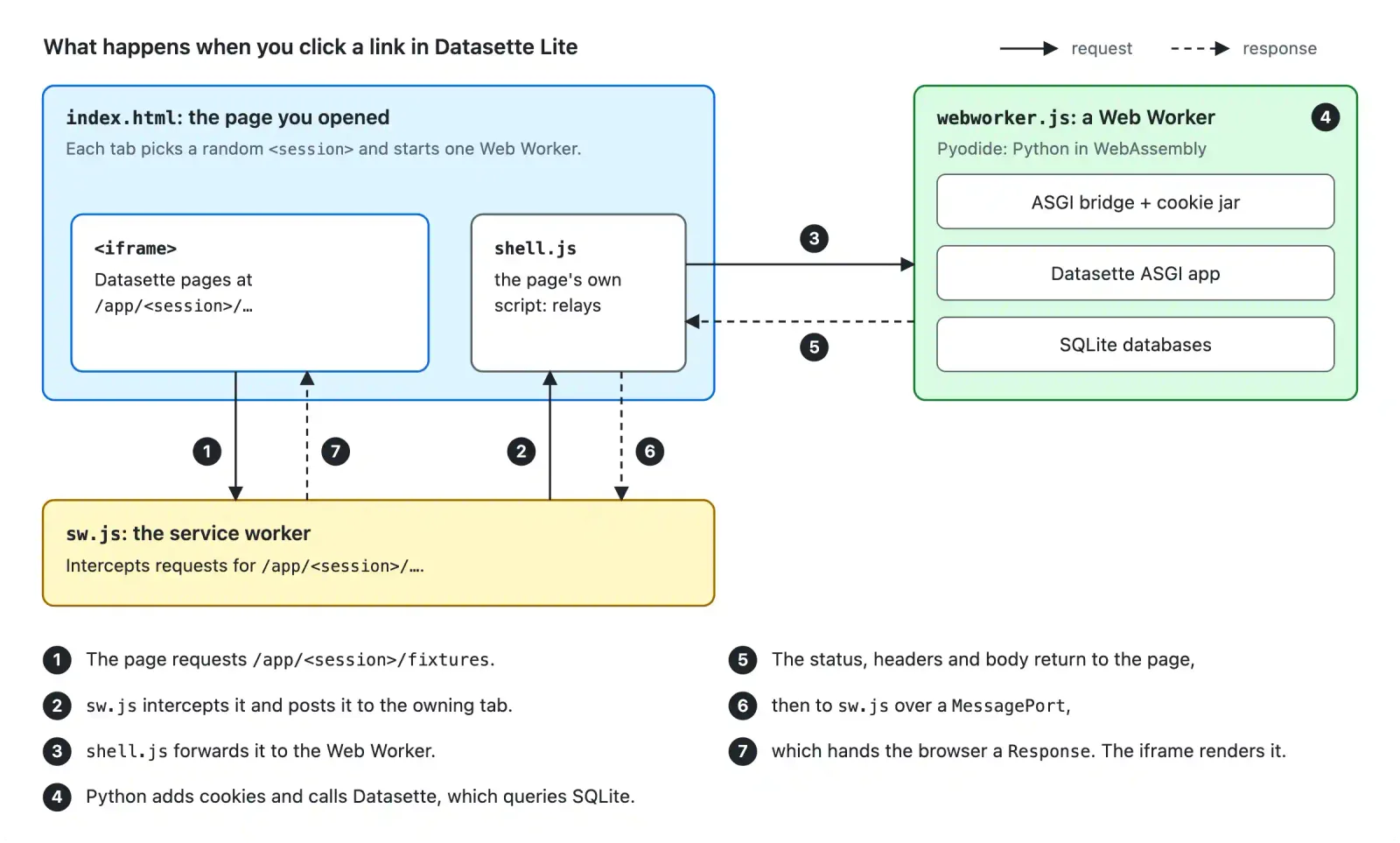
This system started life back in May as an AI research spike generated using Claude Opus 4.8. It wasn’t until November (and Claude Fable 5.2) that I felt familiar enough with how it all works to confidently ship it to production!
Bonus feature: pick your version of SQLite
I added this feature last night as an off-shoot of investigating a potential bug in SQLite.
Datasette is meant to work against any released version of SQLite since 3.25 (released in September 2018). There have been 87 further releases since then.
Being able to fire up Datasette against a specific version of SQLite is really useful for demonstrating new SQLite features and debugging weird issues.
In the past I’ve used various tricks to get different SQLite versions running with Python on my Mac, but it’s not a trivial process.
WebAssembly is perfect for this. I can load up a custom SQLite build entirely in my browser, test it there, then discard it when I close my tab.
datasette/pysqlite3-wasm-wheels is my new repository which contains WebAssembly compiled Python wheels for pysqlite3 for 163 different SQLite versions. Each version gets a file with a name like this:
pysqlite3-0.6.2-3.54.1-cp314-cp314-pyemscripten_2026_0_wasm32.whl
That’s for SQLite 3.54.1, the most recent version.
Datasette Lite now takes a special ?sqlite= URL parameter, which will accept a version number like 3.54.1, resolve the path to the corresponding wheel file, then fetch that wheel and install it into the Pyodide environment and configure Datasette to use it.
Once I’d built the wheels, I decided to have Claude Fable 5.2 build me [this bonus tool](https://datasette.github.io/pysqlite3-wasm-wheels/?versions=3.54.1,3.54.0&sql=select+json_object(%27a%27%2C+(select+json_array(1%29%29%29) for comparing a SQL query across any selected versions of SQLite. Here’s an example showing how select json_object('a', (select json_array(1))) differs between SQLite 3.54.0 and 3.54.1:
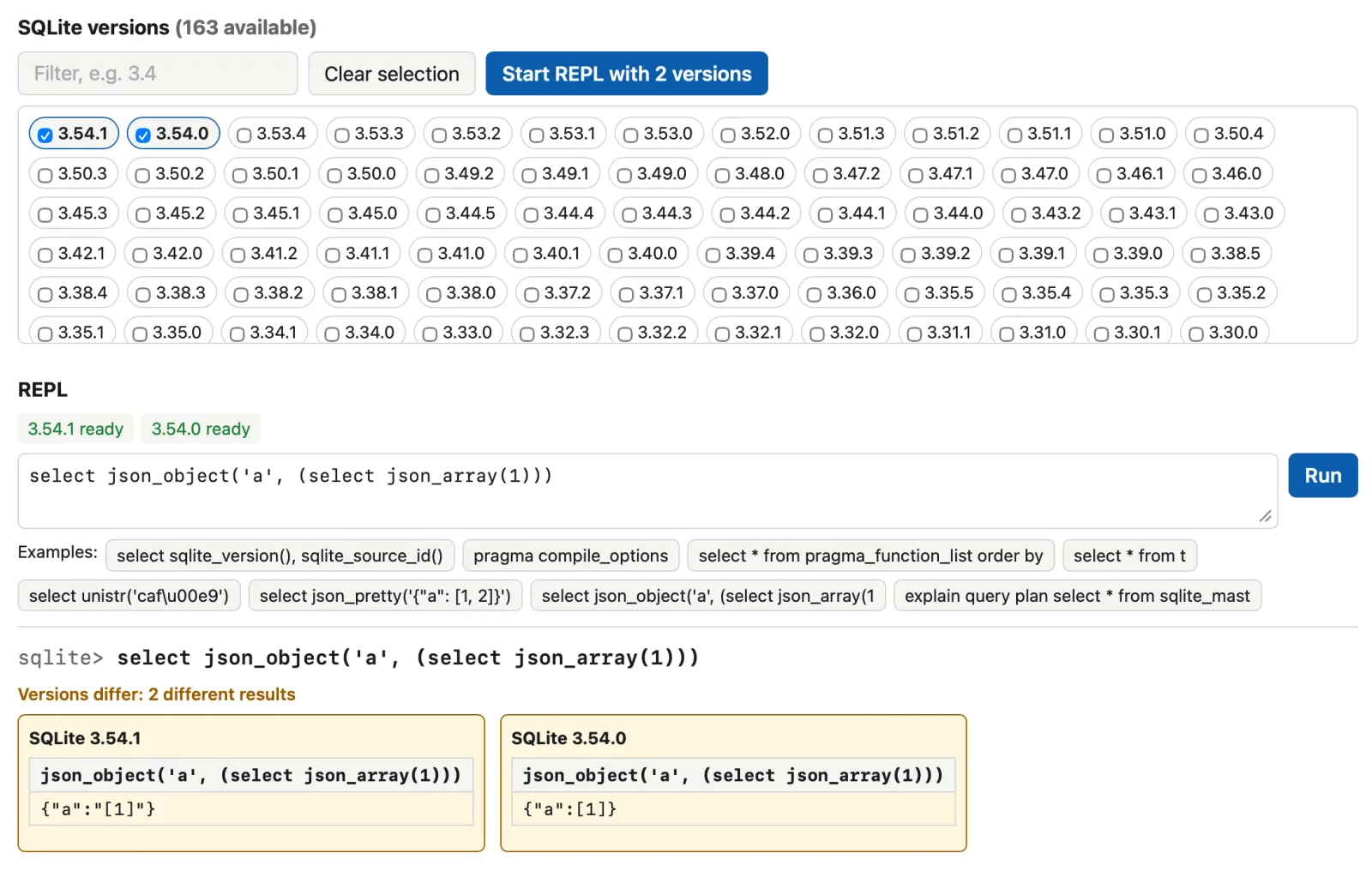
This should work for every other Python app, too
Nothing about how Datasette Lite works is unique to Datasette. Almost any Python application should be able to pull the same trick—running entirely in the browser using WebAssembly and Pyodide, as a cheap way to provide preview environments, demonstrate features, and recreate bugs.
C and Rust extensions used to be a blocker for this kind of thing, but any good coding agent can compile those to Pyodide-compatible WebAssembly now. You can even publish them to PyPI as of PEP 783 in April 2026.
One catch is databases. SQLite is no problem at all, but running PostgreSQL or MySQL in WebAssembly, while possible, is still a path less trodden.
I’d love to see WebAssembly preview environments like these become a common pattern across the Python ecosystem.
For Hacker News: Full server-side Datasette Python app in the browser with service workers
Source: Simon Willison · simonwillison.net